Farcaster Mini App Integration Guide
This guide walks you through creating a Farcaster Mini App using BetSwirl’s React UI library.
What you’ll build: A fully functional multi-game with multi-chain support, custom theming, and background image - exactly like our live demo .
Time: ~1 hour
Prerequisites
- Node.js v18+
- Git
- GitHub account
- Vercel account
- Farcaster app on mobile and access to farcaster.com on computer
Create MiniKit Project with BetSwirl
Fork Repository
Step 1: Fork Repository
Fork this repository: https://github.com/BetSwirl/miniapp-ui-react-demo
Click the “Fork” button in the top right corner to create your own copy.
Step 2: Clone and Run
# Clone your forked repository
git clone https://github.com/YOUR_USERNAME/miniapp-ui-react-demo.git
cd miniapp-ui-react-demo

# Install dependencies and start dev server
npm install
npm run dev
Open in browser http://localhost:3000/
What You Have Now
Your Farcaster Mini App is ready with the following features already configured:
- BetSwirl SDK integration with support for Base, Arbitrum, and BSC
- MiniKit wallet connection and Farcaster Mini App functionality
- Multiple games with navigation (Dice, Coin Toss, Roulette)
- Custom theme and branding
- Freebet system for user promotions
- Leaderboard support for competitive tournaments
- Token selection and balance management
- Responsive UI optimized for mobile
Next steps: Deploy to Vercel and configure environment variables to make your app accessible to Farcaster users.
Deploy to Vercel
Deploy your Farcaster Mini App to Vercel using Git Integration:
- Sign in to vercel.com with GitHub
- Click “Add New…” → “Project”
- Select your repository
- Click “Import” → “Deploy”
- Get public URL after ~2 minutes
Check Domain Settings (Optional)
After deployment, Vercel automatically creates a public domain for your app (e.g., your-project.vercel.app). This domain works immediately and you can use it for the next steps.
If you want to customize your domain or add a custom domain, you can do so in the Vercel project settings:
View your automatically created domain:
- Go to your project on Vercel
- Open the “Settings” tab
- Go to the “Domains” section
To add a custom domain:
Environment Variables
The Farcaster manifest is a JSON configuration file that describes your Mini App to Farcaster - its name, description, icons, and other metadata. This manifest is required for your app to work in Farcaster. Learn more: Publishing Mini Apps .
Your project generates this manifest through the API route app/.well-known/farcaster.json/route.ts. This file reads environment variables and creates the manifest JSON during build.
After you add environment variables (next step) and redeploy, your manifest will be publicly accessible at https://[your-app].vercel.app/.well-known/farcaster.json.
You can find all environment variables in .env.example. If you need more details, see the official Manifest properties documentation .
The template includes default images in the public/ folder. You can replace these with your own images, keeping the same file names and recommended dimensions:
- icon.png - App icon
- splash.png - Splash screen
- hero.png - Hero image for app preview
Quick start: Download
.env.example, copy it to.env, replaceNEXT_PUBLIC_URLwith your Vercel domain, then replace all occurrences of$NEXT_PUBLIC_URLwith your full domain URL (e.g.,https://your-app.vercel.app), and upload the entire file to Vercel. All other variables have working defaults or can be filled later.
Environment Variables:
# ════════════════════════════════════════════════════════════════════
# > Minimum required for first deploy (manifest)
# ════════════════════════════════════════════════════════════════════
# Replace with your Vercel domain - this is the ONLY variable you must change
NEXT_PUBLIC_URL="https://[your-app].vercel.app"

# These have working defaults, but you can customize:
NEXT_PUBLIC_APP_PROJECT_NAME="YOUR_PROJECT_NAME"
NEXT_PUBLIC_APP_ICON=$NEXT_PUBLIC_URL/icon.png
NEXT_PUBLIC_APP_HERO_IMAGE=$NEXT_PUBLIC_URL/hero.png # For app preview

# ════════════════════════════════════════════════════════════════════
# > Recommended for search indexing (manifest, can add now or later)
# ════════════════════════════════════════════════════════════════════
NEXT_PUBLIC_APP_DESCRIPTION="Your app description"
NEXT_PUBLIC_APP_SUBTITLE="Your App Subtitle"
NEXT_PUBLIC_APP_SPLASH_IMAGE=$NEXT_PUBLIC_URL/splash.png
NEXT_PUBLIC_SPLASH_BACKGROUND_COLOR="#your-color-in-hex"
NEXT_PUBLIC_APP_PRIMARY_CATEGORY=games

# ════════════════════════════════════════════════════════════════════
# > Optional metadata (manifest, can add now or later)
# ════════════════════════════════════════════════════════════════════
NEXT_PUBLIC_APP_TAGLINE=
NEXT_PUBLIC_APP_OG_TITLE=
NEXT_PUBLIC_APP_OG_DESCRIPTION=
NEXT_PUBLIC_APP_OG_IMAGE=$NEXT_PUBLIC_URL/hero.png

# ════════════════════════════════════════════════════════════════════
# > BetSwirl SDK settings (not in manifest, can add now or later)
# ════════════════════════════════════════════════════════════════════
# Earn 30% commission from bets
NEXT_PUBLIC_AFFILIATE_ADDRESS=

# Test mode (let to false if you don't know what it is)
NEXT_PUBLIC_TEST_MODE="false"

# ════════════════════════════════════════════════════════════════════
# > Custom RPC endpoints (not in manifest, can add now or later)
# ════════════════════════════════════════════════════════════════════
# Without these, the app uses free public RPCs which may be slower
NEXT_PUBLIC_BASE_RPC_URL=
NEXT_PUBLIC_ARBITRUM_RPC_URL=
NEXT_PUBLIC_BSC_RPC_URL=

# ════════════════════════════════════════════════════════════════════
# > Account Association - LEAVE EMPTY FOR NOW
# ════════════════════════════════════════════════════════════════════
# Not in manifest - used for account association verification
# You'll get these values after completing the Account Association step below
FARCASTER_HEADER=
FARCASTER_PAYLOAD=
FARCASTER_SIGNATURE=
Add Environment Variables on Vercel
Follow these steps to add Environment Variables on Vercel:
-
Go to your project on Vercel
-
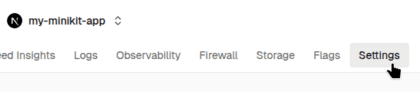
Open the “Settings” tab
-
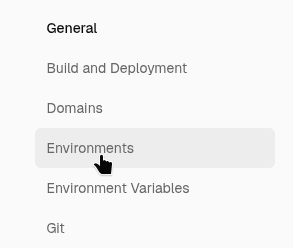
Go to the “Environments” section
-
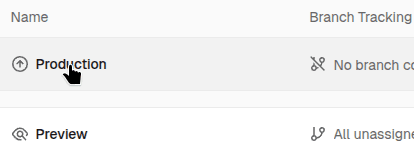
Select the “Production” domain
-
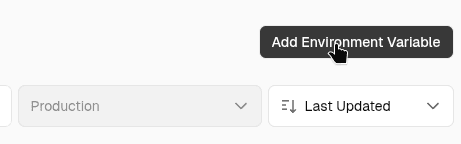
Click “Add Environment Variables”
-
Add all Environment variables at once by pasting them into the input field or importing your
.envfile to avoid adding them one by one. Replace$NEXT_PUBLIC_URLwith your public URL in all variables where it is used.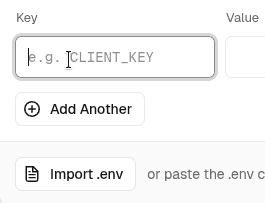
-
Click “Save”
Redeploy
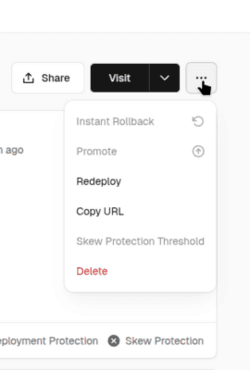
If you added environment variables for the manifest in Vercel project settings after deployment, you need to redeploy.
- Go to your project dashboard in Vercel
- Click on the “Deployments” tab
- Select the latest deployment
- Click the “Redeploy”
Test Farcaster Mini App
After deployment, the manifest can be viewed at this URL - https://[your-app].vercel.app/.well-known/farcaster.json
To test your manifest:
- Go to https://farcaster.xyz/~/developers/mini-apps/manifest
- Paste your domain in the field without https and trailing slash (
[your-app].vercel.app)
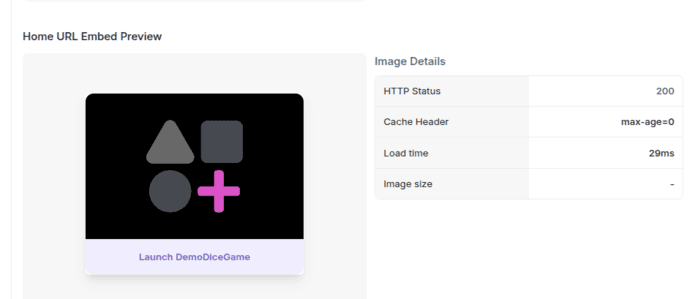
After that, you’ll be able to see your manifest and launch the mini-app in the Farcaster Mini App.
If the manifest is valid, you’ll see - "Mini App configuration is valid." in the “Mini App Configuration” section.
You can launch the application by clicking the Launch button.
If the manifest is not valid, check if you have correctly filled all required environment variables and redeployed after making changes.
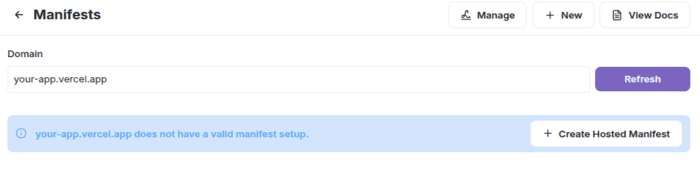
This message - "[your-app].vercel.app does not have a valid manifest setup." appears if the domain is not associated with your account. It’s not required for Farcaster Mini App rendering or testing.
Additional Information:
Post Your Farcaster Mini App
Once you have a valid manifest, you can share your Farcaster Mini App by posting its URL (https://[your-app].vercel.app) in a Farcaster cast. Users will be able to launch it directly from the cast. This will work even without generating Account association.
Account Association
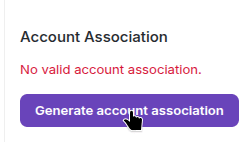
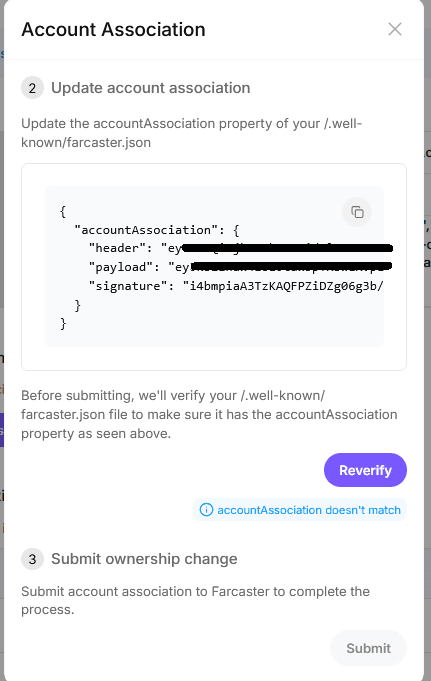
Account association links the domain to your account. After this, users will be able to add your application to their Farcaster Mini App list. You can generate a signed account association object using the Mini App Manifest Tool in Farcaster. You need to have the Farcaster app installed on your phone.
On the manifest page:
- Click the “Generate account association” button
- Copy your
accountAssociationmessage and add these variables to your Vercel project.
These values are generated after you sign the message in Farcaster app and are required for search indexing in Farcaster:
How add environment variables on Vercel
FARCASTER_HEADER=
FARCASTER_PAYLOAD=
FARCASTER_SIGNATURE=- Redeploy your app
- Return to the manifest page Mini App Manifest Tool and refresh it, or click the “Reverify” or “Refresh” button.
In the Account Association section, you should see
"✓ Associated with your account"next to your domain.
Additional Information:
Farcaster Mini App Search Visibility
For your app to appear in Farcaster’s Mini App search, Account Association must be configured. Without it, your app will not be included in search results.
Set these variables if they are not already set:
# Required for search indexing
NEXT_PUBLIC_APP_DESCRIPTION="Your app description"

# Recommended to set. May be required for search indexing in Farcaster
NEXT_PUBLIC_APP_SUBTITLE="Your App Subtitle"
NEXT_PUBLIC_APP_SPLASH_IMAGE=https://[your-app].vercel.app/splash.png
NEXT_PUBLIC_SPLASH_BACKGROUND_COLOR="#your-color-in-hex"
NEXT_PUBLIC_APP_PRIMARY_CATEGORY=gamesFor more information, see: App Discovery & Search
More resources
- How to Add Multiple Games - Switch between Dice, CoinToss, Roulette and more
- How to Add a Chain - Add or change supported blockchain networks
- How to Check Available Tokens
- BetSwirlSDKProvider configuration Reference - All BetSwirlSDKProvider parameters, Leaderboard Integration, Custom Branding
- Hosted Manifest Guide
- MiniKit Documentation
- Farcaster Mini Apps Publishing
- Mini App Chainhacker’s guide deployment - A guide helping to fork the miniapp-ui-react-demo template and deploy it to Vercel
- BetSwirl StoryBook